

Скачать yFlicks – Организатор видео, Плеер & Менеджер библиотеки
Обзор
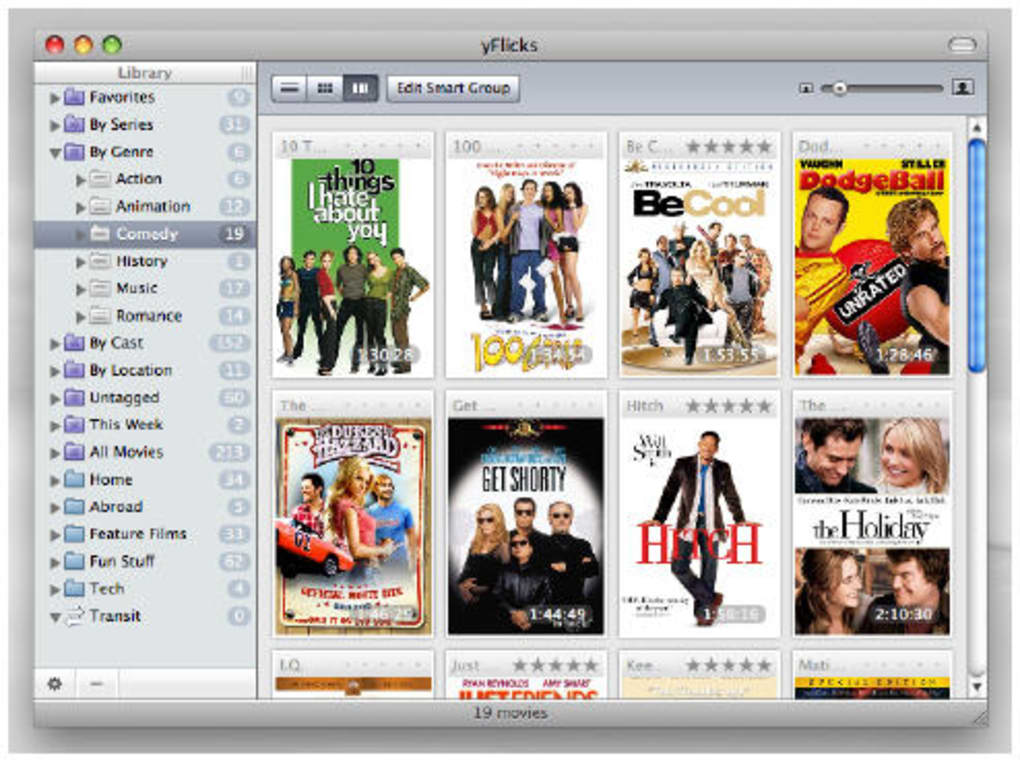
yFlicks — это специально созданное настольное приложение, которое позволяет полностью контролировать вашу видеотеку. Независимо от того, есть ли у вас несколько независимых фильмов, огромная библиотека эпизодов сериалов или смесь загруженных клипов с YouTube и DailyMotion, yFlicks предоставляет стильный визуальный способ просматривать, предварительно просматривать и воспроизводить каждый заголовок. Главная особенность программы — её **Front Row view**, сетка изображений обложек высокого разрешения, прокручиваемая горизонтально, имитирующая ощущение физической полки с медиа. При наведении курсора на любую миниатюру автоматически запускается быстрая превью, позволяющая убедиться в правильности файла без открытия полноценного плеера.
Интерфейс намеренно упрощён: навигационные панели находятся слева и показывают ваши пользовательские списки, а главное окно отображает обложки в стиле альбомов. «Стеклянный» скин добавляет полупрозрачный, современный вид для пользователей, предпочитающих более полированный эстетический стиль. Помимо организации, yFlicks также служит полноценным видеоплеером. Воспроизведение в полноэкранном режиме плавное, а вы можете оценивать заголовки, помечать их жанрами или группировать в пользовательские коллекции прямо из окна воспроизведения.
Интеграция с Apple Remote делает yFlicks идеальным спутником для любителей дивана. Одно нажатие на пульте может запустить Front Row view, пролистать заголовки и начать воспроизведение, позволяя оставаться удобно сидящим, пока вы смотрите сериалы. Инструменты импорта позволяют загружать видео с популярных платформ обмена, а встроенный экспортер может синхронизировать выбранные фильмы с iPod или другими устройствами iOS, превращая ваш мобильный гаджет в портативный кинотеатр.
Хотя yFlicks выделяется визуальным просмотром и поддержкой пульта дистанционного управления, у него есть два заметных недостатка. При росте количества записей библиотека может стать медленной, что приводит к периодическим задержкам при прокрутке больших коллекций. Кроме того, после покупки программного обеспечения вы можете столкнуться с небольшим ожиданием перед получением лицензионного ключа, что может раздражать пользователей, желающих сразу приступить к работе. Несмотря на эти нюансы, yFlicks остаётся надёжным выбором для тех, кто ценит красивый, основанный на миниатюрах способ управления и наслаждения видеофайлами.
Ключевые функции, установка & первый запуск
- Front Row view с миниатюрами обложек высокого разрешения.
- Мгновенный предварительный просмотр при наведении для быстрой идентификации контента.
- Чёткие левые навигационные панели для пользовательских плейлистов и категорий.
- Опциональный стеклянный интерфейс для современного, полупрозрачного вида.
- Воспроизведение в полноэкранном режиме с возможностью оценки, пометок и группировки.
- Совместимость с Apple Remote для управления без рук.
- Прямой импорт с YouTube, DailyMotion и других видеохостингов.
- Функция экспорта для синхронизации фильмов с iPod и устройствами iOS.
- Поддержка множества видеоформатов, включая MP4, MKV, AVI и MOV.
- Автоматическое получение метаданных для обложек, описаний и дат выпуска.
**Installation** – Getting yFlicks up and running is straightforward. After purchasing, you’ll receive a download link via email. Click the link to download the installer (approximately 45 MB). Run the .dmg file on macOS or the .exe file on Windows; the wizard guides you through standard steps: accept the license agreement, choose an installation folder, and click “Install.” Once the process completes, launch yFlicks and enter the license key you received.
**First‑time configuration** – On first launch, yFlicks prompts you to point the application to your video library folder. You can add multiple directories, allowing the software to index all supported files. The indexing process may take a few minutes depending on library size; yFlicks displays a progress bar and shows how many files have been scanned.
After indexing, the Front Row view appears automatically. Drag and drop folders onto the left‑hand pane to create custom collections such as “Family Movies,” “Documentaries,” or “Watch‑Later.” To customize the appearance, open **Preferences → Appearance** and toggle the “Glass Skin” option, choose thumbnail size, or select a dark/light theme. For remote users, enable **Apple Remote** under **Preferences → Remote**, then map the remote buttons to actions like “Next Cover,” “Play/Pause,” and “Rate.”
**Playing a video** – Click any cover to open the playback window, or simply hover over a thumbnail to see a 5‑second preview. While playing, the toolbar offers quick access to rating stars, a “Add to Group” button, and a “Full‑Screen” toggle. The player also supports subtitles (SRT, VTT) and audio track selection, making it suitable for multilingual content.
System Compatibility & Performance
yFlicks is primarily designed for macOS (10.12 Sierra and later) and Windows 10/11. The macOS version runs natively, taking advantage of Core Animation for the glass interface and offering tight integration with the Apple Remote via Bluetooth. The Windows build, while fully functional, relies on a compatibility layer that mirrors many macOS UI elements, ensuring a consistent experience across platforms.
**Hardware requirements** are modest: a dual‑core CPU (Intel i3 or equivalent), 4 GB of RAM, and at least 200 MB of free disk space for the application itself. Video playback performance depends on the codecs used; yFlicks leverages hardware acceleration on supported GPUs (Intel HD Graphics 4000+, NVIDIA GTX 600 series+, AMD Radeon HD 7000+). For high‑resolution 4K files, a more powerful GPU and 8 GB of RAM are recommended to avoid frame drops.
Despite the modest hardware needs, many users report noticeable lag when the library exceeds a few thousand titles. The Front Row view loads thumbnails on demand, but the caching algorithm can become overwhelmed, resulting in delayed scrolling and occasional UI freezes. The development team has released patches that improve thumbnail caching and introduce background indexing, which mitigates the issue for most medium‑size libraries (up to 2,000 files). However, power users with massive collections (5,000+ movies) may still experience occasional slowdown.
**Software dependencies** – yFlicks bundles FFmpeg for format conversion and metadata extraction, so you do not need to install additional codecs. It also includes a lightweight web scraper for YouTube/DailyMotion imports, which adheres to each platform’s terms of service. Regular updates (approximately every 2–3 months) bring bug fixes, new format support, and performance enhancements. The update process is automatic: a notification appears within the app, and clicking “Update” downloads and installs the latest version without losing your library configuration.
Pros, Cons, Frequently Asked Questions
Pros
- Visually appealing Front Row view makes browsing enjoyable.
- Instant hover preview speeds up content identification.
- Apple Remote support enables true couch‑friendly operation.
- Integrated video player with rating and grouping features.
- Easy import from popular video‑sharing sites and export to iPod.
- Customizable glass interface for a modern look.
- Supports a wide range of video formats out‑of‑the‑box.
Cons
- Library can become sluggish with very large collections.
- License key delivery may be delayed after purchase.
- Windows version lacks some native macOS UI polish.
- No built‑in streaming server; playback is local only.
- Limited subtitle styling options compared to dedicated players.
Can yFlicks import videos directly from YouTube?
Yes. yFlicks includes a built‑in downloader that can fetch videos from YouTube, DailyMotion, and a few other popular sites. After entering the video URL, the app downloads the file in MP4 format and automatically generates a cover thumbnail.Is the glass interface optional?
Absolutely. The glass skin can be toggled on or off in the Preferences → Appearance panel. Users on older hardware may prefer the classic flat look for better performance.Does yFlicks support subtitle files?
Yes. During playback you can load external SRT or VTT subtitle files. The player also offers basic styling options such as font size and color, though it does not have the advanced styling found in dedicated subtitle editors.Can I sync my library with an iPhone?
While yFlicks does not have a native iPhone app, you can export selected movies to an iPod or iPhone using the built‑in export tool. The exported files appear in the device’s Videos app, allowing you to watch them on the go.Is there a free trial or a free version?
yFlicks offers a 14‑day free trial that includes all premium features. After the trial expires, you’ll need to purchase a license to continue using the full application.Overall Rating: 4 out of 5 stars
Summary: yFlicks delivers a visually rich way to manage and watch video collections, especially for users who love thumbnail‑driven browsing and remote‑control playback. Minor performance hiccups in very large libraries keep it from a perfect score, but the feature set justifies the modest price.
Conclusion – Should You Download yFlicks?
If you own a sizable video library and value a clean, image‑first browsing experience, yFlicks is a compelling choice. Its Front Row view, hover preview, and Apple Remote integration create a home‑theater feel that few competitors match. The built‑in player is capable enough for everyday viewing, and the ability to import from YouTube or DailyMotion adds a convenient way to expand your collection without leaving the app.
The primary concerns—occasional lag with thousands of titles and a short license‑key wait time—are worth noting, but they rarely outweigh the benefits for most casual and power users alike. For anyone who prefers a traditional list view or needs ultra‑fast library scanning, a more lightweight manager might be preferable. However, for those who enjoy a sleek, glass‑y interface and want to control playback from the couch, yFlicks hits the sweet spot.
Ready to give your video collection a fresh look? Download yFlicks now, start the free trial, and experience a new way to organize, preview, and play your movies.







